
Where days go sideways
It isn't laziness. It's what happens when an ADHD brain runs into a clock.
Time blindness
3 pm and 8 pm feel the same distance away. A list doesn't fix that. A timeline you can see does.
If logging takes five taps, it doesn't happen
The urge to jot it down only lasts a few seconds. Miss that window and it's gone.
Out of sight, out of mind
Tasks, meals, money. People, too. It's not that you don't care. It's that nothing reminds you in time.
The shame spiral
Most apps punish the gap. Broken streaks, red badges. You stop opening them.
I built AideyHD for myself first, because I have ADHD and needed it. Everything on this page comes out of that.
Log lunch in two taps
Try it. This is the real flow, rebuilt for the browser. Tap a chip, then tap Log.
Meals
Nothing logged yet. That's fine.
Log meal
Those buttons are chips, and they're yours to set up. Pin the things you log all the time, and the one-offs stay out of your way. Everything has an undo too, so a stray tap costs you nothing.
That's the whole app. Want the real one?
Join the beta on TestFlight
Free · about 2 minutes via Apple's TestFlight · no email, no AideyHD account
What it does
Five screens do most of the work. Here's each one, and what it's for.
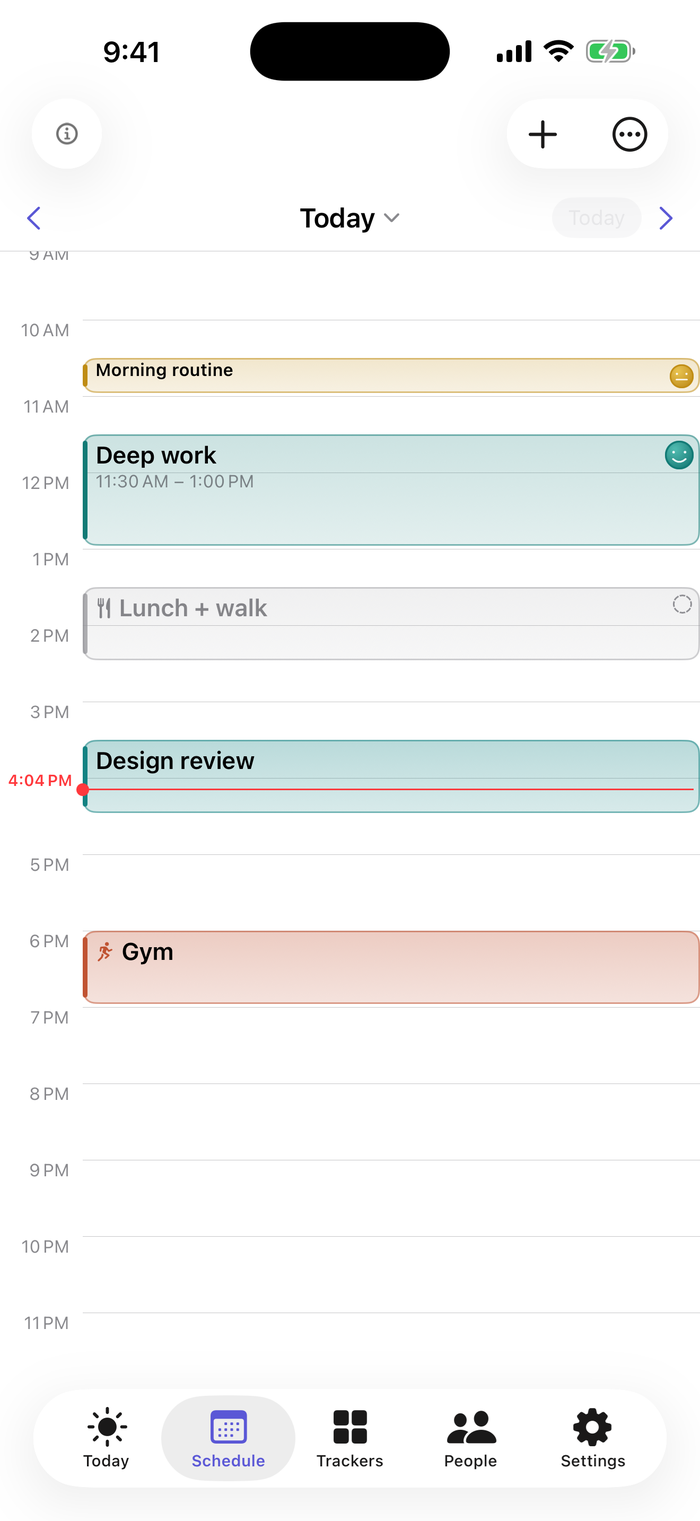
3 pm and 8 pm stop feeling the same
Your day is a real calendar now, drawn to scale, so you can feel how much time sits between now and the next thing. Drag a block to move it, pull an edge to stretch it, or tap an empty gap to add one. Pinch to fit the whole day on screen, swipe to see tomorrow.
Already in Google or Apple Calendar? Bring it in, and your events keep the colors of the calendars they came from. Reminders land at the start and end of each block, and they can break through Focus when you want them to.
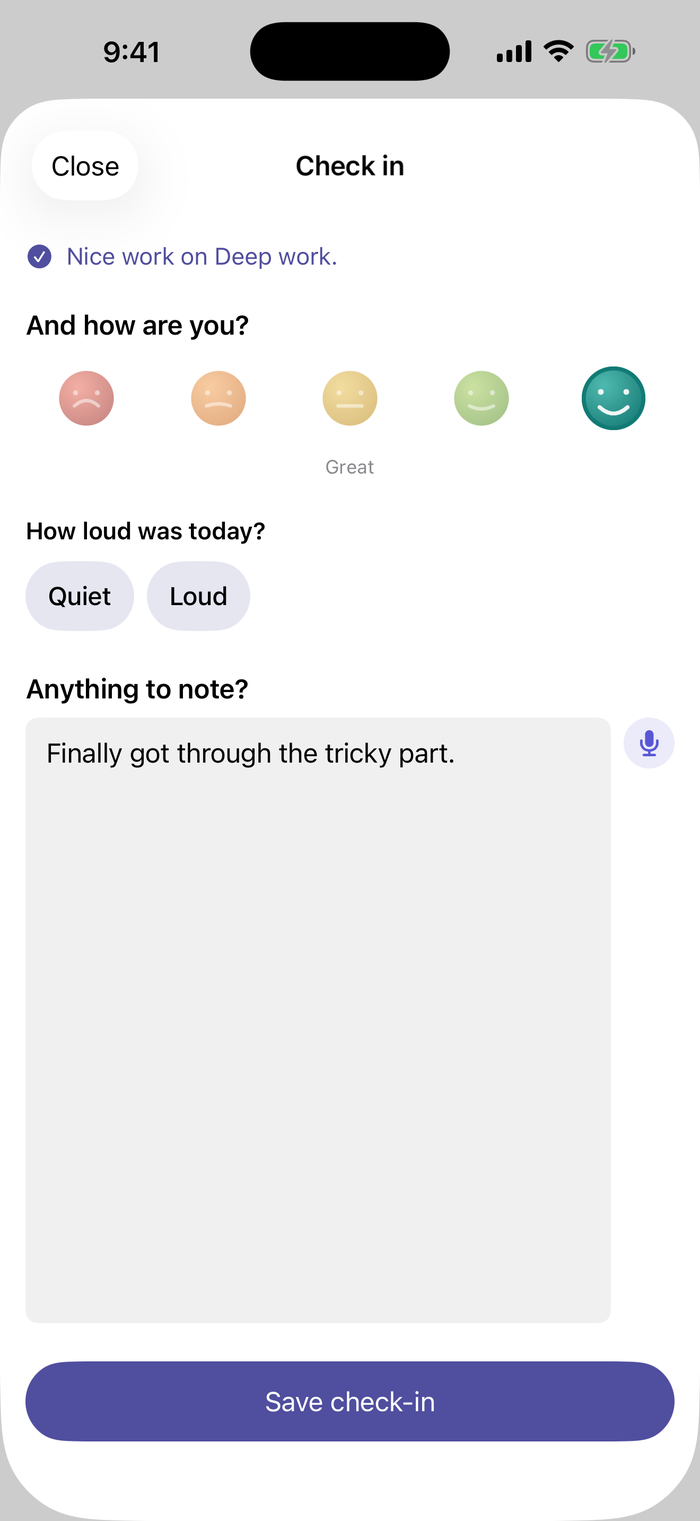
How it went, in two taps
Did it happen, and how do you feel? One tap for each. The moods are faces with names, from Rough to Great, so there's no score to optimize. It takes about five seconds, then you're back to your day.
One more small question comes along too, a different one each day. Loud or quiet day? Where was your energy? One tap, always skippable, and the answers give the patterns something new to look at.
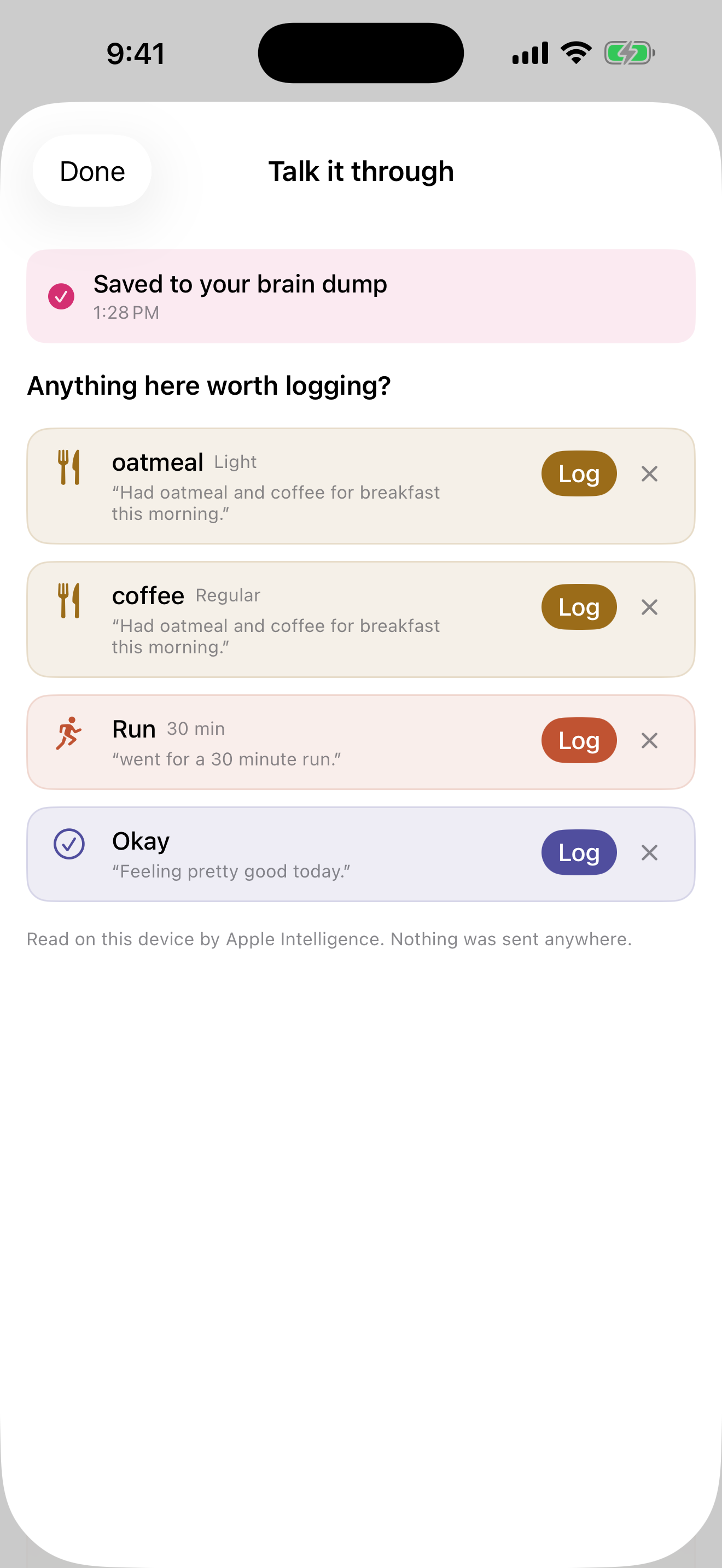
Getting it out of your head is the point
Some days you don't want a form. Tap the mic and say what happened, for as long as you want, and it goes in your brain dump.
Then it reads back what it heard and offers it as things you might log. The oatmeal, the run, the mood you mentioned in passing. Tap the ones that are right, wave off the rest, or close the screen and keep the words on their own.
The reading happens on the phone itself, which is why it's free like the rest of the app and why nothing gets sent anywhere. It doesn't answer back. It's a place to put things down, not someone to talk to.
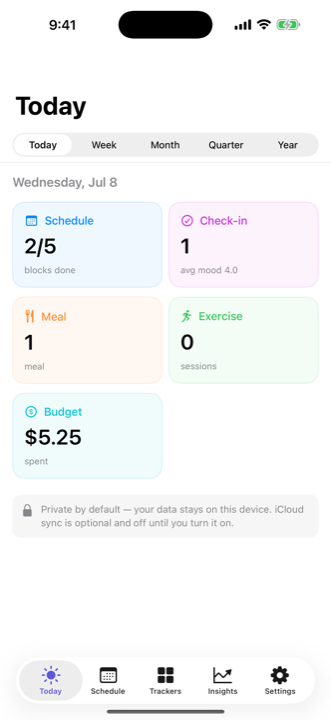
Your whole day, at a glance
The block you're in, then the day's trackers at a glance. Tap Week to zoom out to a week, a month, a quarter, a year, and the trends show up as bars.
You log a face, never a score. Zoomed out, that face turns into a word and a number, like Good · 3.7 of 5, so the trend stays readable without any single moment getting graded.
It matches your phone automatically, light or dark.
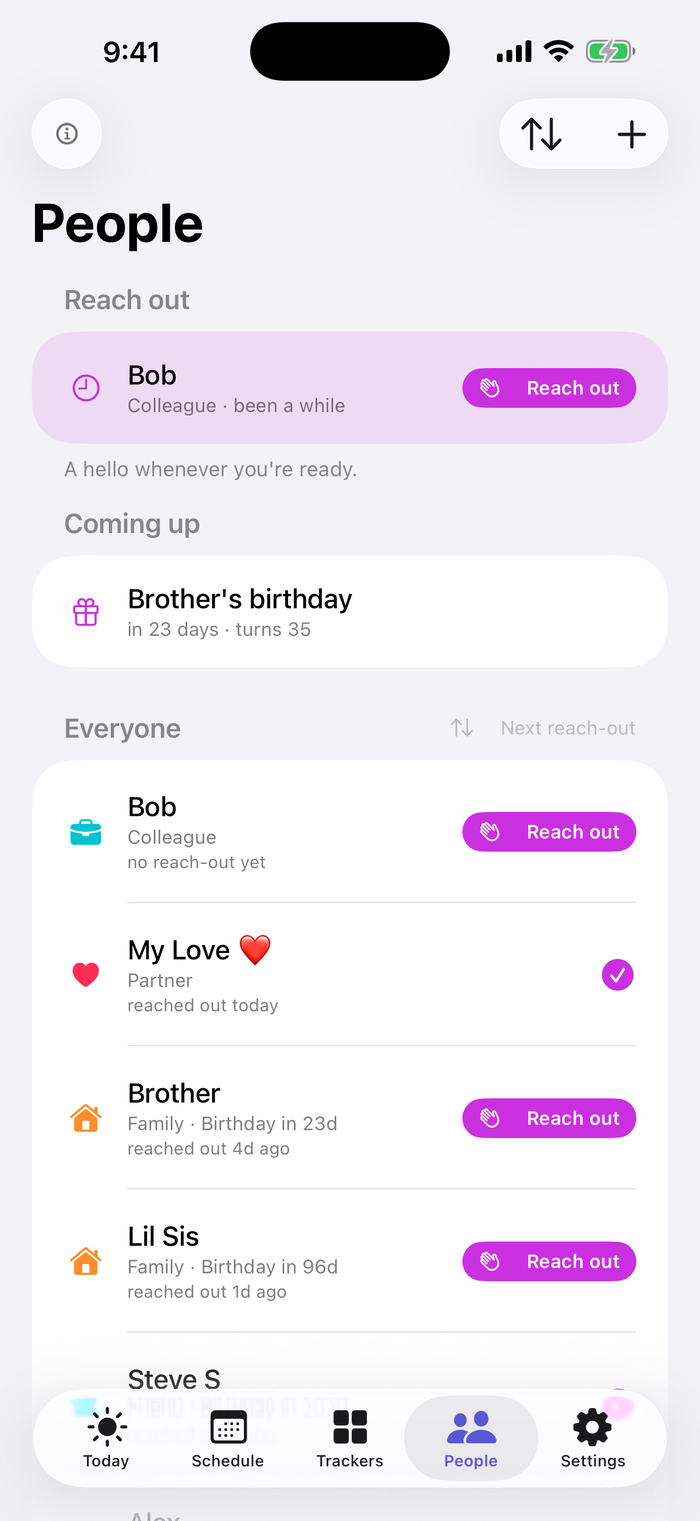
The people you keep meaning to text
Reach out to someone and it's a small celebration. Jot down what you talked about afterward, and the next time you won't be starting from a blank page.
Why some days work
Log your days, and it starts looking at what lines up with what. When something clears the bar, you see it.
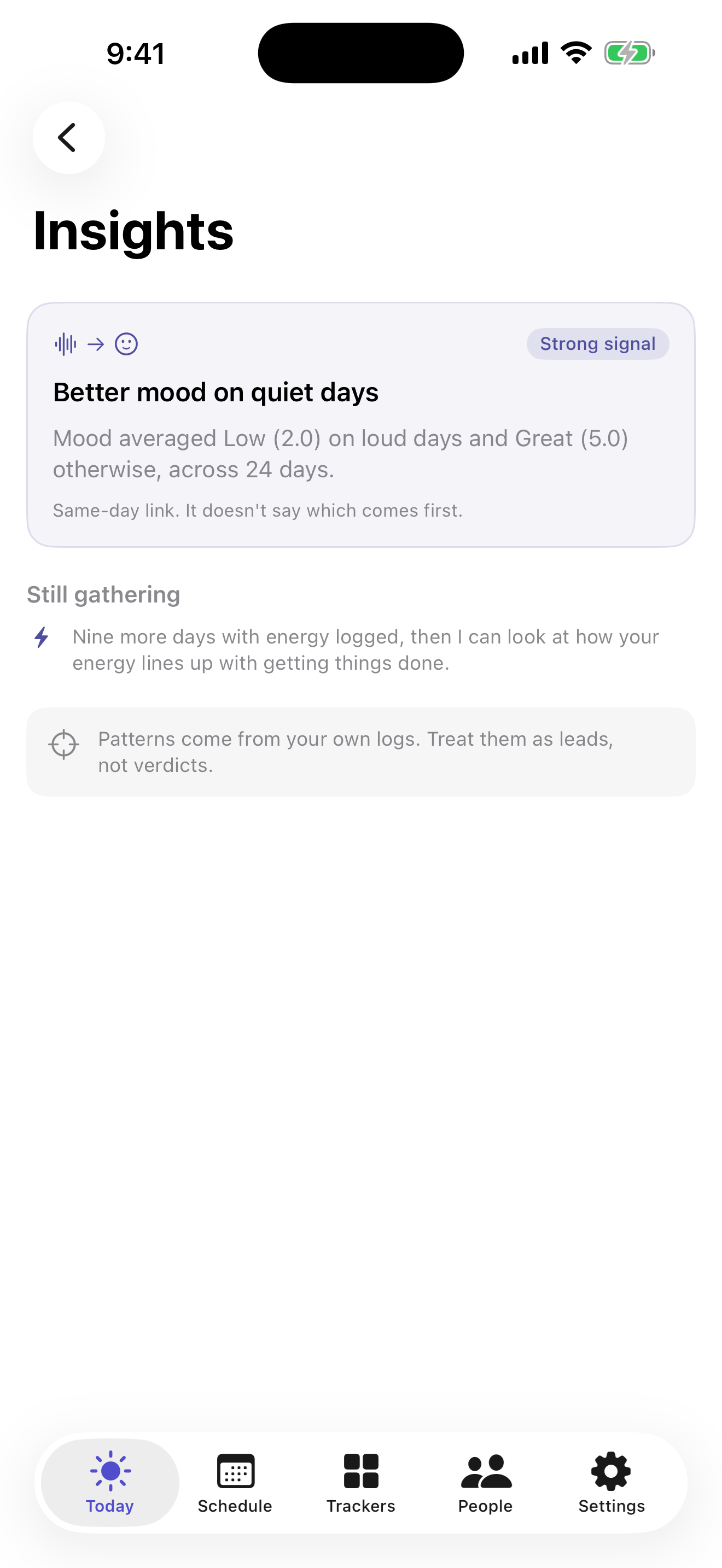
It waits until the numbers hold up
Better moods on the days you moved. A finish rate that slips after a shorter night. Quiet days that line up with better moods. Things that are true of your days and would take a spreadsheet to find.
Nothing surfaces until you've logged 21 days. Every comparison it runs gets corrected against all the others. Each finding shows the days behind it, how strong the signal is, and whether the timing lets it say which came first.
It always says what it's waiting for. Nine more days with energy logged, say, before it can look at how your energy lines up with getting things done.
Patterns are leads, not verdicts.
What else you can track
Schedule and check-ins are the core, and they're always on. Everything below is optional and starts switched off, so your first day isn't a setup screen. Each one you turn on is one more thing the patterns can look at.
Meals
Pin what you eat often. Log it again in a tap.
Exercise
A walk counts. Log movement in a tap and watch the week add up.
Sleep
Log a night by hand, or read it from Apple Health. It only reads sleep, and only if you connect it.
Budget
Amount and category, and that's it. It's a record of what you spent, not a budgeting system to keep up with.
Brain dump
A blank page for whatever's loud in your head. Type it out, or talk it through.
History
Everything you've logged, grouped by day. Filter to one tracker, or tap an entry to edit it.
Why it's like this
Every ADHD app promises to be different. Here are the actual decisions, with what they replaced.
Nothing to break
A broken streak becomes a reason to quit, so there isn't one. What's there is a small line tracing how the last couple of weeks went. It never hits zero, one log lifts it the same day, and after a few days away it says pick back up whenever.
Instead of: points, virtual pets, "don't break the chain."
Skipped isn't red
A block you didn't get to turns gray, not red. You can still tap it any time to reflect, and the mood you log there keeps its full color even though the block doesn't.
Instead of: overdue badges.
On a heavy week, it asks less
If your logging thins out, the app offers to make check-in smaller: one screen, your answer, and a mood if you feel like one. Switch back whenever you like, and nothing you've logged goes anywhere.
It goes by how much you've been logging lately, never by what the moods say. An app that treats you differently for admitting a bad day teaches you to stop admitting them.
Instead of: the app deciding how you're doing.
Every six weeks it changes a little
The apps I quit before building this one weren't bad. They were identical every day until I stopped seeing them. So every six weeks or so, AideyHD starts a new chapter: a fresh accent color, the mood faces redrawn, check-in asking about different things. Nothing you've logged moves, and there's nothing to keep up with.
Instead of: an app that's the same on day 200 and hopes you don't notice.
People are part of focus
Losing touch is an ADHD casualty too. Reaching out gets a small celebration, and you can jot what you talked about so the next one has somewhere to start.
Instead of: "overdue: call Mom (12 days)."
Never sync. The word is Import.
Bring your calendar in and it becomes your blocks to keep. Nothing is written back.
Instead of: a background sync with account access that writes into your real calendar.
Eight more decisions
Undo, not "are you sure?"
Confirmation dialogs get dismissed on reflex. Every delete is instant, with five seconds to take it back.
Instead of: dialogs nobody reads.
Never lock between impulse and log
Face ID protects your data. But a check-in from a notification opens above the lock, because the moment doesn't wait.
Instead of: security that costs the log.
A timeline, not a list
Blocks drawn to scale make the shape of the day visible. That's the direct counter to time blindness.
Instead of: the checklist.
The widget invites, it doesn't nag
It knows the time of day, which trackers you use, and what block is in front of it. After 9 pm it goes quiet.
Instead of: "Drink some water!" and taps that lead nowhere.
Type or talk
There's a mic next to the longer fields, like a note, the brain dump, or a reach-out. The recognition runs on your device wherever the system allows it.
Instead of: sending your voice off-device to save you some typing.
Nothing's written until you tap it
Say your day out loud and it reads it back as guesses, right on your phone. The suggestions wait. A wrong one costs a glance, and the ones you tap are the only ones that get logged.
Instead of: parsing your words on a server and logging them for you.
A direction to come back to
Set one thing you're working toward and the next small step. It sits on your Today screen and inside the block you're in, so the goal is there at the moment you'd usually drift from it.
Instead of: a goal system that measures you and becomes one more thing to fall behind on.
A due date is a fact. Urgency isn't.
Things you're waiting on sit in a short list, three at a time. A due date brings one into view when it's close. It never grades what matters most, because that's a judgment, and it's yours.
Instead of: priority flags, red overdue labels, an algorithm ranking your life.
If those decisions sound like the app you wanted, it's open.
Join the beta on TestFlight
Free · about 2 minutes via Apple's TestFlight · no email, no AideyHD account
The words matter
Same events, different sentences.
-
Pick back up anytime.
Most apps: 🔥 Streak broken!
-
Ready to log lunch?
Most apps: You forgot to log lunch.
-
Been a while. Want to say hi?
Most apps: Overdue: call Mom (12 days)
-
There is no profile.
Most apps: Complete your profile to continue.
And it doesn't say them the same way twice. Any line you'd see more than a handful of times comes from a pool of a dozen, drawn so it won't repeat until it's been through the whole set. Same voice, different day. Try it.
The widget knows what time it is
When a block's coming up, the widget shows it before you'd think to check. When you're free, it offers a small nudge that fits the time of day, then stays out of the way.
After 9 pm the widget goes quiet. No app should talk to you at midnight.
Your data lives on your phone
On iPhone, iCloud sync is off until you turn it on. Android has no sync; your data stays on the phone. There's no account to make.
Nothing is watching what you log.
And you can leave: export everything as CSV or JSON, any time.

Hi, I'm Edwin.
I have ADHD. I built AideyHD for myself first, after years of apps that started as a good idea and ended as one more thing making me feel behind. The streaks, the red badges, the five taps to log one thing. I stopped opening all of them.
It started as just the schedule, because losing track of time was costing me the most. Then the trackers, one at a time, whenever I noticed something else worth remembering. There was never a plan to turn it into a business, so there was never a reason to add the parts that make an app easier to sell and worse to use.
So this one doesn't do that. It's free because I'd rather it be useful than lucrative, and your data stays on your phone because that's how I'd want mine.
github.com/AngkasaEdwin · support@aideyhd.com
That email goes to me. There's no one else.
Free. Actually free.
There's no subscription. Every feature is on from the first launch, and the app carries no ads. If it helps you, there's a tip jar in Settings.
I read a lot of reviews of apps in this space before building this one. The complaint that came up again and again wasn't the features, it was the billing. So this is my answer to it.
Free · about 2 minutes via Apple's TestFlight · no email, no AideyHD account
Questions
Is this a medical or therapy app?
No. It's a personal secretary: schedule, logs, reminders. No diagnoses, no advice, no clinical claims.
Do I have to set everything up first?
No. Schedule and check-ins work from the first minute. Turn on meals, exercise, sleep, budget, or the brain dump whenever you want them.
Where does my data live?
On your device. On iPhone, iCloud sync is an optional toggle, off by default, and goes through your own iCloud account. Android has no sync, so your data stays on that phone.
Does it listen to me?
Only when you tap the mic. It's there for fields worth talking instead of typing, and recognition runs on your device wherever the system supports it.
Does it use Apple Health?
Only if you connect it, and only to read your sleep. Nothing is written back. You can log sleep by hand instead, or leave it off.
Can I bring in my existing calendar?
Yes. Import a .ics file, or pick calendars already on your phone, and the events become normal blocks you can edit and check in on. It reads your calendar and writes nothing back. It runs only when you tap Import.
Will it tell me what lines up with my mood?
It waits until you've logged 21 days. After that, it looks at what lines up in your own logs: better moods on the days you exercised, or after a longer night's sleep. It shows how confident it is, and it only says which came first when the timing allows. These are things to notice, not diagnoses.
It says what it's waiting for in plain words, like two more nights of sleep logged before it can look at whether longer nights line up with better moods. And the moment something clears the bar, you see it. It's your data, so nothing gets held back to be released later.
What if it's ever too much?
There's a switch for that, called Lighter check-ins. Check-in drops to one screen: your answer, and a mood if you feel like one. The daily question pauses and keeps everything it has collected. If your logging thins out, the app offers this once on its own. Otherwise it waits in Settings.
What it never does is read your moods to decide you need it. It only looks at how much you've been logging. Telling it about a bad day shouldn't change how it treats you.
Android? Web?
iPhone and Android, both in open beta. iPhone goes through TestFlight, Android through Google Play. There's no web app, because it's built to live on your phone.
When can I try it?
It's open. Join the beta on TestFlight. Free, private, and there's no AideyHD account to make.
It takes about two minutes: install Apple's TestFlight app, tap Join, done. Apple runs the beta, which is why there's no signup form here, and why you'll need an Apple ID (the one you already use for the App Store). I never see it.
Once you're in, there's a Send feedback button in Settings that comes straight to me; tell me what's working and what isn't. TestFlight has its own way too: screenshot the app, then tap Share Beta Feedback.
What happens to my logs when the beta ends?
They stay. Your entries live in the app's own storage on your phone, not a server of mine that could go away, so they carry across beta updates and on into the public version when it ships. And if you'd rather hold your own copy regardless, Settings ▸ Export hands you every entry as CSV or JSON, any time.
Why "AideyHD"?
It's ADHD with an aide in it. That's the job: an aide for a brain that runs in high definition, everything at once and all of it vivid. Not an AI, just an aide.